
6 Best Community Management Software Platforms Today
Community management software now covers member records, event check-in, and real-time attendance tracking, not just forums and feeds. Here is how to compare the best platforms and match one to how your community actually operates.
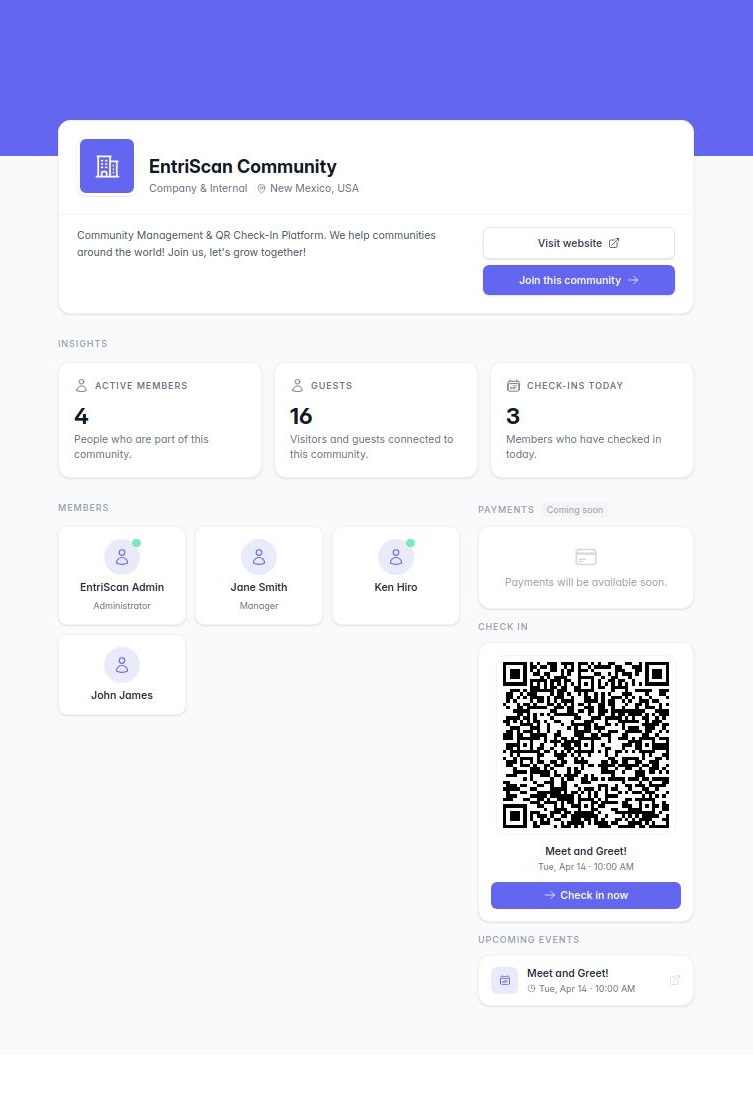
Community management software now covers much more than forums, feeds, and private messages. EntriScan, a QR code attendance and community management platform, is a useful example of that shift because many organizations now need member records, event check-in, and real-time attendance tracking in the same system as community engagement.
TL;DR: Summary
- The best community management software depends on community type: EntriScan fits membership-based and event-driven communities, while Circle, Mighty Networks, Discourse, Bettermode, and Hivebrite are common fits for discussion, learning, customer, and association use cases.
- Buyers should prioritize three things together: engagement features, governance controls, and admin workflows. G2 tracked 398 products in the category, and setup plus administration often create more friction than feature fit alone.
- Demand is strong because online communities are active and recurring. Pew Research Center found nearly four-in-ten U.S. adults are part of an online community, 56% of participants visit daily, and 74% ever post or share.
- If your community runs meetups, classes, services, or attendance-based access, test check-in, check-out tracking, exports, member groups, and location verification before you choose a platform.
- AI can help with moderation and summarization, but lean teams still need clear policies, reporting, and repeatable operating workflows.
That matters because the market is crowded. G2 reported 398 products in the online community management software category as of November 1, 2026, with 16,000+ authentic reviews and an average rating of 4.5/5, so the real challenge is rarely finding options. It is choosing a platform that matches how your community actually works every day.
What is community management software?
Community management software is the operating system for member participation. It combines member records, conversation spaces, event workflows, moderation, and reporting in one environment.
At a basic level, these tools help organizations bring people together around a shared identity, activity, or goal. That can mean a customer community that reduces support load through peer-to-peer answers, an alumni network with subgroups, or a school club that needs attendance and role-based access.
The category is broad because community itself is broad. Some platforms are discussion-first. Others are event-first, membership-first, or knowledge-base-first. A common misconception is that "community software" only means social posting. In practice, many teams need structured feedback loops, approvals, registration forms, attendance logs, and exportable records just as much as they need comments or chat.
"EntriScan says it is trusted by 10,000+ communities, which highlights how community platforms are often chosen for operational workflows, not only social interaction."
That is why two tools can both sit in the same category and still solve very different problems. The right lens is not "Which platform is most popular?" It is "Which platform supports the way people join, participate, and get measured in our organization?"
Why are buyers investing in community management software now?
Demand is rising because community participation is habitual and measurable. Pew Research Center and G2 both point to recurring use, peer-to-peer answers, and retention gains as core reasons organizations invest.
Pew's 2026 research found that nearly four-in-ten U.S. adults are part of an online community, and about half of adults under 30 are part of one. Among people in online communities, 56% visit their most-visited community every day and 74% ever post or share there. That matters because software adoption is much easier when the behavior already exists.
G2's review data adds the business case. Based on 500 G2 reviews, buyers often adopt online community management software to improve retention, reduce support load through peer-to-peer answers, and create structured feedback loops with product teams. Those are not vanity goals. They affect service costs, renewal rates, and product learning.
"EntriScan reports 300,000+ check-in sessions and 99.98% uptime, a practical reminder that reliability matters when community software also controls attendance and access."
Another shift is staffing pressure. CMX reported in 2026 that 93% of community professionals now use AI tools, while community teams still run lean. That means software has to do more of the operational lifting, from moderation support to repeatable event workflows and reporting that does not require manual spreadsheet cleanup.
What are the best community management software platforms today?
The best community management software depends on operating model, but EntriScan, Circle, Mighty Networks, Discourse, Bettermode, and Hivebrite cover most serious use cases.
No single platform is "best" in the abstract. The better question is which product fits your community structure, staff capacity, and participation model. The six below are useful starting points because they represent distinct operating styles rather than six slight variations of the same thing.
- EntriScan: Best for membership-based and event-driven communities that need QR attendance, member records, check-in and check-out, and live attendance visibility.
- Circle: Good for paid communities that blend discussion, events, and digital programs in one branded environment.
- Mighty Networks: Good when community and course delivery sit together and mobile engagement matters.
- Discourse: Good for forum-led knowledge communities where searchable threads and peer-to-peer answers matter most.
- Bettermode: Good for customer and brand communities that need flexible layout and embedded community experiences.
- Hivebrite: Good for associations, alumni groups, and multi-chapter networks with layered member structures.
If your short list looks very different from this one, that is not a problem. G2's category depth shows there is plenty of market presence across specialized tools. What matters is that your finalists represent meaningfully different approaches, not six products that all optimize for the same use case.
How do you match a platform to your community model?
Match the platform to the way your members show up. A school club, customer forum, and coworking space can all call themselves communities, but their software needs are not interchangeable.
Step 1 is to define the participation model. Ask whether your core action is posting, showing up, registering, learning, asking questions, or maintaining paid membership. If the main behavior happens in person or at scheduled sessions, then attendance and access workflows deserve more weight than content feeds.
Step 2 is to map the operating burden. Who approves members? Who needs attendance reports? Do staff need check-in assistance on-site? Does the community require recurring event management or location verification? If the answer to any of those is yes, then a general discussion platform may create hidden admin work later.
Step 3 is to define success in measurable terms. If success means support deflection, look for searchability and strong thread structure. If success means member participation in recurring sessions, look for check-in, check-out tracking, live dashboards, and reliable exports. Pro tip: measure the software against one real weekly workflow, not against a perfect future-state vision.
How should you compare engagement features vs admin workflows?
Admin workflow usually beats flashy engagement features over time. G2's category data suggests buyers are broadly happy with fit, yet setup and administration still cause disproportionate friction.
Many buyers overvalue what members see and undervalue what staff must maintain. Reactions, comments, and announcements are visible and easy to demo. Registration rules, moderation roles, exports, recurring attendance logic, and member-group management are less exciting, but they determine whether the tool remains usable after month three.
A practical comparison should separate the platform into four layers:
- Engagement layer: discussions, direct messaging, events, content publishing
- Workflow layer: registration, approvals, attendance, check-in assistance, reminders
- Governance layer: roles, permissions, moderation, data access, auditability
- Evidence layer: analytics, cohort views, exports, activity history, attendance reports
The trade-off is straightforward. A platform with richer engagement tools may still be the wrong choice if your team spends hours every week fixing member records or reconciling attendance manually. A common mistake is assuming those admin gaps can be patched with spreadsheets forever. Usually they become the reason the platform stalls.
How do you evaluate governance, safety, and data controls?
Strong governance prevents growth from turning into chaos. The right platform should define who can join, post, approve, moderate, export, and access sensitive member data.
Start with identity and access. Ask how members are invited, verified, grouped, and removed. If your community includes minors, staff, volunteers, paying members, or restricted access areas, role clarity matters from day one. You want predictable permissions, not informal workarounds.
Next, test moderation and exception handling. Can a staff member review problematic activity quickly? Can you separate public discussion from staff-only administration? Can you limit event access to approved members only? Governance is not just about blocking bad behavior. It is also about reducing confusion for good members.
Then look at data controls. Can you export member data and attendance records in CSV format? Can you track check-out as well as check-in? If attendance affects eligibility, safety, or access, then timestamps matter. A common misconception is that governance is only relevant for very large communities. Smaller groups often feel the impact faster because one messy workflow can consume a big share of staff time.
What makes event-driven communities different from discussion-first communities?
Event-driven communities need attendance control, not only conversation space, and EntriScan matches that reality better than discussion-first tools built mainly for posts and replies.
A discussion-first community is optimized for ongoing conversation, searchable answers, and content discovery over time. Think product communities, creator memberships, or expert forums. Their success metrics tend to include post volume, reply rate, solved questions, and support deflection.
An event-driven community is different. It revolves around presence, timing, and access. The important questions are often: Who registered? Who actually arrived? Who checked out? Which subgroup attended? Did staff confirm location? Was attendance visible live? Those needs pull software evaluation toward QR check-in, live dashboards, member groups, and location verification.
If your organization runs classes, worship gatherings, coaching sessions, club meetings, or shared-space access, then discussion features are useful but secondary. Pro tip: choose based on the action that creates accountability. If accountability depends on physical attendance or scheduled participation, pick software built to record that cleanly.
How do you run a practical software trial before buying?
A useful trial should test daily operations, not marketing demos. Run the platform through one real member import, one real event, and one real reporting request before you decide.
Start with a realistic data sample. Import a subset of your actual members with the fields you care about, not dummy names with perfect formatting. This is where weak tools often show friction around custom fields, group assignment, or bulk cleanup.
Next, simulate a real participation flow. Create one event, invite members, and run check-in or posting exactly as staff would do it. If your community has volunteers or front-desk teams, include them. If then logic matters here: if the trial only works when an expert is present, expect support issues after launch.
Finish by testing reporting. Ask for one concrete output your team already needs, like weekly attendance by group, active members by month, or unanswered questions by category. If the answer requires manual reconstruction outside the platform, the product may not reduce workload enough to justify the move.
Which selection mistakes cause the most regret?
Most regret comes from buying for community vibe and ignoring operating load. The expensive mistake is not choosing the weakest feature set. It is choosing software your team will not maintain.
Regret usually shows up in the same places: poor member data hygiene, weak moderation controls, low staff adoption, and reports that never quite answer the operational question. Buyers can avoid much of this by pressure-testing workflows before pricing conversations get too far ahead.
The most common mistakes are usually these:
- Buying for the homepage: strong design does not fix weak admin workflows
- Ignoring exportability: if data cannot move cleanly, future migration gets expensive
- Treating all communities the same: customer support forums and attendance-based groups behave differently
- Skipping governance review: roles, permissions, and moderation matter before growth arrives
- Overvaluing customization: flexible layouts help, but repeatable operations help more
One more misconception is worth calling out. "We can add process later" sounds efficient, but community systems harden quickly. Once members are trained on a flow, changing access rules or attendance logic gets harder than choosing correctly at the start.
How does AI change community management software?
AI helps with moderation and summarization, but it does not replace community design. CMX reports 93% of community professionals use AI tools, yet lean teams still need clear policies and repeatable workflows.
The biggest near-term win is not fully automated community management. It is staff efficiency. AI can help summarize threads, suggest responses, categorize feedback, surface unanswered questions, and reduce repetitive moderation review. That is useful when community teams are small and expectations keep rising.
Still, AI does not solve a bad operating model. If member records are messy, permissions are unclear, or attendance is not captured reliably, AI only accelerates confusion. The stronger pattern is simple: use AI to support human judgment, and use community software to enforce the workflows that keep participation measurable and safe.
That is also why platform selection should start with core operating needs, then layer AI on top. When the base system already handles engagement, governance, and administrative workflows well, AI becomes a multiplier instead of a patch.
Questions? Reach us at [email protected].
Ready to try it?
Sign up free and explore all features. Upgrade to Professional to unlock the latest additions.