
6 Best Community Attendance Software Platforms Today
Community attendance software tracks who actually shows up to your club, chapter, or association, not just who signed up. Here is how EntriScan, Wild Apricot, Raklet, Glue Up, and ClubExpress compare.
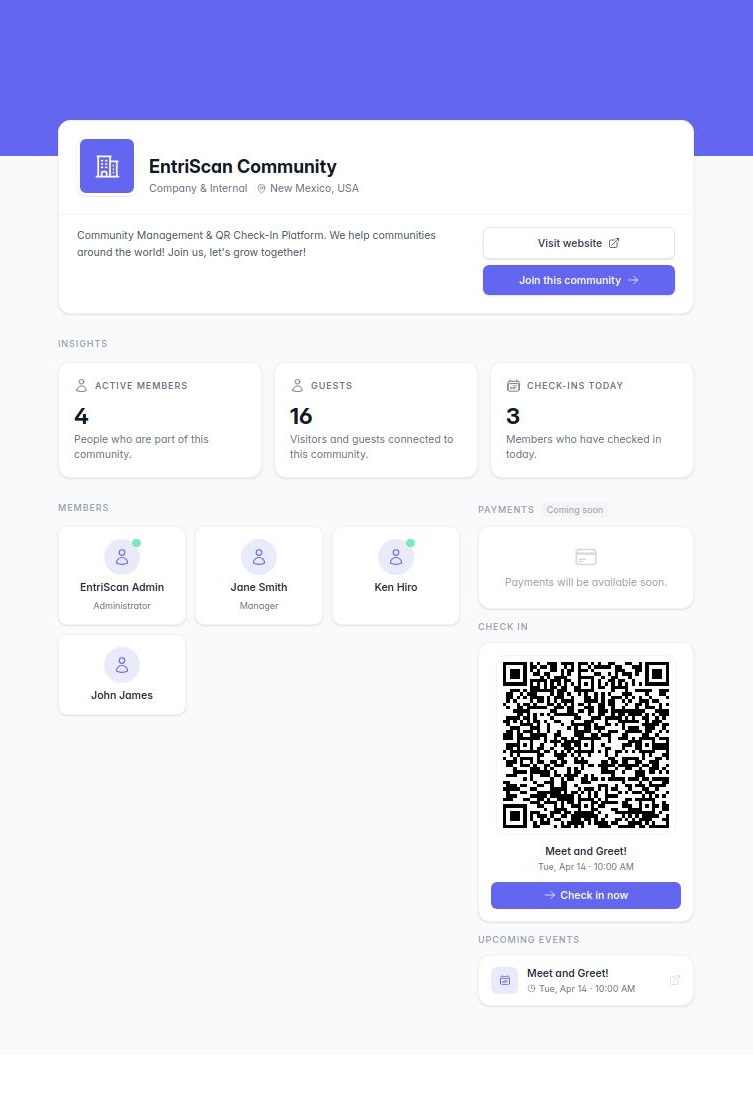
If your club, chapter, or association needs to know who actually showed up to a meeting or event, not just who's on the roster, you need community attendance software: a member directory with check-in and attendance history built in. Here's how EntriScan compares to Wild Apricot, Raklet, Glue Up, ClubExpress, and memberplanet.
TL;DR: Summary
- Community attendance software tracks who belongs and who actually shows up: member records, QR code check-in, and attendance history, not discussion boards or social feeds.
- EntriScan, Wild Apricot, Raklet, Glue Up, ClubExpress, and memberplanet all serve clubs, nonprofits, and associations, but they differ in how check-in works and how much of the platform is built around attendance specifically.
- If your group runs recurring meetings, classes, or chapter events, prioritize QR check-in, check-out tracking, member groups, and exportable attendance reports over discussion or forum features.
- Most of these tools bundle membership dues, a website, and event registration alongside attendance. Decide which of those you actually need before comparing price.
- Run a real trial with your own member list and one real meeting before committing. A platform that looks complete in a demo can still fall short on the one workflow you use every week.
What is community attendance software?
Community attendance software keeps a member directory and a record of who showed up to each event or session, in one system instead of a spreadsheet and a separate sign-in sheet. It's built for clubs, nonprofits, faith groups, hobby communities, and membership associations whose members meet in person or online on a recurring basis.
A school club that needs attendance and role-based access has very different requirements than a customer community built around discussion threads and support deflection. Community attendance software optimizes for the first case: who's a member, who's active, and who actually attended.
What are the best community attendance software platforms today?
The right platform depends on how your group is structured and what you already pay for, but EntriScan, Wild Apricot, Raklet, Glue Up, ClubExpress, and memberplanet are common starting points for clubs and membership organizations.
- EntriScan: Built around QR code attendance and member records first. Members get a personal QR code, staff scan it to check someone in, and attendance history rolls up to a dashboard without a separate website or forum layer to maintain.
- Wild Apricot: A membership management platform for nonprofits, associations, and clubs with a website builder, online payments, and an admin mobile app that supports QR code check-in at events.
- Raklet: Membership management software for associations and clubs with an "At The Door" module that scans either a one-time event ticket QR code or a permanent digital membership card to check members in.
- Glue Up: An all-in-one platform for associations and chambers that connects event check-in (QR codes scanned from a confirmation email or app) directly to member CRM records and renewal status.
- ClubExpress: Membership and association management software with a member database, dues and renewal tracking, and event registration, built for clubs and associations from 25 to 25,000 members.
- memberplanet: A membership app with an event check-in feature (passcode-based or manual by an admin) and a participation tracker for recording attendance, volunteer hours, and credits.
If your short list looks different from this one, that's fine. The point of comparing these six is that they represent different combinations of membership management and attendance tracking, not that one is universally "best."
How do you match a platform to how your community actually meets?
Start with how people show up, not with a feature list. A sports club, a faith group, and a professional association can all call themselves a "community," but their attendance needs look different.
Step 1 is to define what "attended" means for your group. Is it a QR code scan at the door, a passcode entered online, or just a headcount a volunteer reports after the fact? A QR code scan is faster and leaves a more reliable record than a manual roll call or a shared spreadsheet.
Step 2 is to check whether attendance is a core feature or an add-on. Some membership platforms treat check-in as one module among many (a website builder, a payment processor, a forum); others, like EntriScan, build the whole product around attendance. Neither approach is wrong, but a core feature tends to be more reliable under real use than a module bolted onto a broader platform.
Step 3 is to confirm the platform supports how your group is organized. If you run multiple chapters, teams, or programs, look for member groups so you can check in and report on each one separately while still seeing the whole organization.
What should you check before choosing one?
A practical comparison should separate the platform into three layers: member records, attendance, and everything else (website, payments, discussion).
- Member records: Can you bulk import your existing list? Can you group members by chapter, team, or tier?
- Attendance: Does check-in happen by QR code, passcode, or manual entry? Can you track check-out as well as check-in? Can you export attendance history?
- Everything else: Does the platform also handle dues, a public website, or event ticketing? If you already use separate tools for those, weigh whether you want to migrate everything at once or keep attendance tracking separate for now.
The most common mistake is buying for the parts of the platform that are easiest to demo, like a polished website or branded member app, and only discovering during the first real event that check-in requires extra steps or that attendance reports need manual cleanup afterward.
How do you run a practical trial before buying?
A useful trial tests one real meeting, not a sales demo. Import a subset of your actual members, run one real event, and pull one real attendance report before you decide.
Start with a realistic data sample: your own members, with the fields you actually track, not a handful of demo names. This is where platforms differ most, in how much cleanup custom fields and group assignment require.
Then simulate the real check-in flow. Have a volunteer or front-desk staffer run it exactly as they would on the day, not an administrator who already knows the software. If check-in only goes smoothly when an expert is driving it, expect friction after launch.
Finish by pulling the one report your organization already needs, like attendance by chapter for the past quarter, or a list of members who haven't attended recently. If producing that report requires manual work outside the platform, the tool may not save as much time as it appears to in a demo.
Does EntriScan replace a membership platform entirely?
Not necessarily, and that's by design. EntriScan focuses specifically on member records and attendance, so organizations that already have a website and payment processor they like can add EntriScan for check-in and attendance tracking without migrating everything else at once. Organizations that want dues, a website, and attendance in a single system may be better served by a broader platform like Wild Apricot, Raklet, Glue Up, or ClubExpress.
Either way, the decision should start from how your members actually show up to things, in person, recurring, in groups, not from which platform has the most features on paper.
Questions? Reach us at [email protected].
Ready to try it?
Sign up free and explore all features. Upgrade to Professional to unlock the latest additions.